
AI Summary
AI Summary provides three ways to preview and understand any book — available as readable text and narrated audio. It solves a specific problem: sighted readers can evaluate a book in seconds by skimming; screen reader users need a faster way to decide whether a book is worth hours of listening.
How It Works
Section titled “How It Works”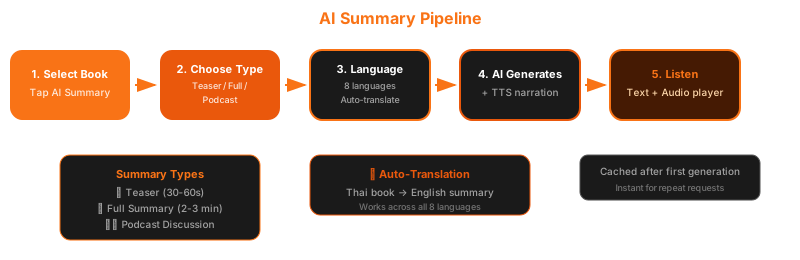
- Navigate to any book’s detail page
- Tap the AI Summary button
- Choose your summary type — Teaser, Full Summary, or Podcast
- Select the output language — regardless of the book’s original language
- The content generates — a brief loading state appears
- Read or listen — the result appears as text with an audio player
Book detail page showing AI Summary button with Teaser / Full / Podcast options
AI Summary result — text summary + audio player with play controls
Summary Types
Section titled “Summary Types”Teaser Summary
Section titled “Teaser Summary”A short, compelling preview designed to help you decide whether to explore further. Think of it as a back-cover blurb read aloud by a natural voice. (30–60 seconds)
Full Summary
Section titled “Full Summary”A detailed overview covering the book’s themes, structure, and key content. Useful when you want to understand a book’s scope before committing to the full reading. (2–3 minutes)
Podcast Discussion
Section titled “Podcast Discussion”An AI-generated conversation between two voices discussing the book — like listening to a podcast review. This format makes it easy to absorb the book’s concepts in a more engaging, conversational style.
Teaser summary — short compelling preview with audio player
Podcast discussion — two-voice AI conversation about the book
Auto-Translation
Section titled “Auto-Translation”One of AI Summary’s most powerful features: it can summarize any book in any supported language, regardless of the book’s original language.
For example:
- A Thai text book → get a summary in English or Japanese
- An English DAISY book → get a summary in Thai or Korean
- Any book → any of 8 supported languages
Supported Languages
Section titled “Supported Languages”| Language | Code |
|---|---|
| Thai | th |
| English | en |
| Chinese | zh |
| Japanese | ja |
| Korean | ko |
| Spanish | es |
| French | fr |
| German | de |
This means a Thai reader can preview an English book in Thai before deciding to read it, or a language student can get a summary in their target language for practice.
Language selection for AI Summary — showing available output languages
Audio Quality
Section titled “Audio Quality”The narrated summary uses AI text-to-speech optimized for spoken delivery:
- Natural pacing and intonation
- Short sentences designed for listening (not reading)
- No formatting artifacts or awkward pauses
- Available in all 8 supported languages
This is not a screen reader voice — it is a narration voice designed for comfortable listening.
Caching
Section titled “Caching”Once a summary is generated for a book, it is cached on the server. Subsequent requests for the same book, type, and language return the cached version instantly — no additional processing time or cost.
VoiceOver Shortcuts
Section titled “VoiceOver Shortcuts”| Gesture | Action |
|---|---|
| Magic Tap (two-finger double-tap) | Play / Pause summary audio |
| Escape (two-finger scrub) | Close summary view |